

TEKLAB / RANSOMWARE RECOVERY
Suspected GhostFrame on ESXi: preserve evidence before recovering data
Suspected GhostFrame on ESXi: preserve logs, VMDKs and snapshot chains, assess credential exposure and validate backups before recovery.
TEKLab · 12/11/2026 · TEKLink225 · Tiếng Việt
When an ESXi host is suspected of compromise, two jobs need to proceed together: determining how access was obtained and protecting the data required for recovery. Rebooting, deleting a suspicious binary or restoring virtual machines immediately can erase evidence or place clean workloads back under an attacker's control.
This guide adapts TEKLab's GhostFrame analysis for teams responsible for recovery. It does not describe a customer case or promise a decryption or recovery result.
Separate the implant from the entry point
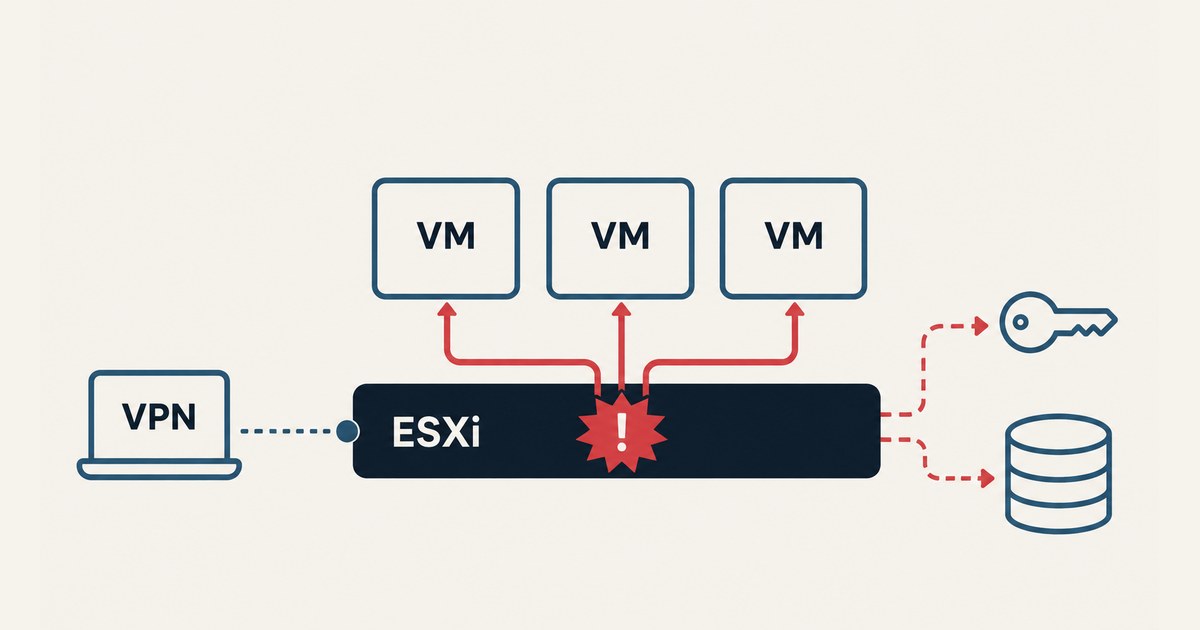
Recorded Future's Insikt Group describes GhostFrame as a post-exploitation framework for VMware ESXi. Its installation requires root access already obtained on the host. Reported capabilities include persistence, virtual-machine control, proxying and access to Windows credentials through virtual-machine data. These capabilities should not be treated as proof that every function was used in every intrusion.
CVE-2026-0257 belongs to Palo Alto Networks PAN-OS GlobalProtect. It is not an ESXi vulnerability. Unit 42 reports a VPN-to-vCenter-to-ESXi path in observed activity, without identifying the tool in that case as GhostFrame. Investigate the initial entry point separately from evidence of hypervisor activity.
Preserve the current state
Record the host and virtual machines involved, timestamps, symptoms and all actions already taken. Preserve ESXi logs, vCenter tasks and events, relevant authentication and firewall logs, startup configuration and suspicious artifacts. Use an evidence location outside the affected virtualization environment and record who collected each item.
The reported paths /opt/vmhostd-core and /etc/rc.local.d/local.sh are investigation leads. A filename or disabled security setting alone does not prove compromise. Compare artifacts with the published research, approved maintenance and the host's baseline before drawing a conclusion.
Do not restart or delete files by reflex. Coordinate containment with evidence collection and operational requirements. Restrict dangerous management or outbound paths in a controlled way. Decisions on shutting down a production host depend on the current threat and the services it supports.
Keep the source data intact
Work from verified copies where possible. Preserve the virtual-disk descriptors, data extents, snapshot chain, virtual-machine configuration and relevant datastore information. Record storage layout and backup locations before changing the environment. Do not consolidate, repair or overwrite a snapshot chain without understanding its state and preserving the available source.
A virtual-machine snapshot is not an independent backup. It may rely on the same datastore, identity and management plane as the affected system. The recovery team needs to establish which copies remain available through a trusted route and whether those copies can actually restore the business service.
Assess credentials and the recovery environment
If a domain controller, backup server or privileged management machine runs on the affected host, assess possible credential exposure as well as data damage. A guest security product may not observe every action taken from the hypervisor. Correlate guest findings with host, identity and network evidence.
Rotate exposed secrets from a trusted environment as part of the response plan. Check vCenter, ESXi, VPN, Active Directory and backup identities. Restoring an application while the attacker retains management access can expose the restored system again.
Validate recovery before returning to service
Agree which services and datasets matter most, the usable backup points and the acceptable data gap. Restore in a controlled environment, verify application consistency and have the business owner check essential workflows. A successful file copy or a VM that powers on is not enough to establish a usable business recovery.
Close the entry point and rebuild compromised infrastructure where the investigation requires it. Keep backup repositories and their identities separate from the virtualization control plane. Test the ability to recover essential services when the original host or management system is unavailable.
What an initial assessment can establish
An initial assessment can document the available source material, suspected scope, candidate recovery paths and remaining uncertainties. It cannot guarantee decryption, completeness or a fixed recovery time without examining the actual data and system state. Do not submit customer samples through public comments or public file links.
Original analysis: GhostFrame and VMware ESXi — TEKLink225.
Sources: Recorded Future, Unit 42, PAN-OS advisory, Broadcom.
TEKLab · TEKLink225 · 12 November 2026. Adapted with AI assistance from supplied material and public sources; no direct malware testing or customer incident verification is claimed.