1. The IDCF Cloud incident and the question of recoverability
IDC Frontier's notice of 8 October 2026 confirmed that ransomware affected 495 companies and local government organisations using part of East Japan Region 1. The provider assessed data extraction or recovery in the affected zones as difficult. At the time of the notice, its assessment was that recovery was only possible from backups held by customers themselves. This is the published situation, rather than a finding that every copy had been destroyed. [1]
Three questions need separate answers: is the service running; do copies of the data still exist; and can the business bring its applications back? High availability reduces interruption when a component fails, but does not automatically preserve a clean history after malicious changes.
TRecovery's perspective: inventory recovery sources outside the incident's scope before estimating how long it will take to rebuild servers.
2. How does a snapshot work?
A point-in-time snapshot records the state of data at a particular moment. That state is often represented by metadata and the necessary blocks, rather than an immediate second copy of the entire disk.
Copy-on-write and redirect-on-write
Conceptually, copy-on-write preserves the old contents of a block before allowing a change; redirect-on-write writes new data elsewhere while retaining references to the earlier state. Reading a snapshot requires resolving those references correctly. Actual mechanisms depend on the filesystem, storage platform or hypervisor. These concepts do not establish how IDCF's infrastructure was designed.
A volume snapshot differs from a VM snapshot
A block storage snapshot focuses on a volume's contents. A VM snapshot may involve configuration, multiple disks and optional memory state. VMware vSphere snapshots normally depend on the original disks and a delta chain. Broadcom warns that delta files alone cannot reconstruct a VM after its base disks are lost. [10]
Damaged metadata may leave data on storage but make it difficult to access. Short retention may remove the last clean recovery point before an incident is detected. An administrator who can delete snapshots may also erase recovery history. A snapshot count in a management console is therefore insufficient to assess survivability.
TRecovery recommends: document the snapshot type, block locations, dependencies, retention and deletion permissions. Test recovery with the source system unavailable.
3. Is a snapshot a backup?
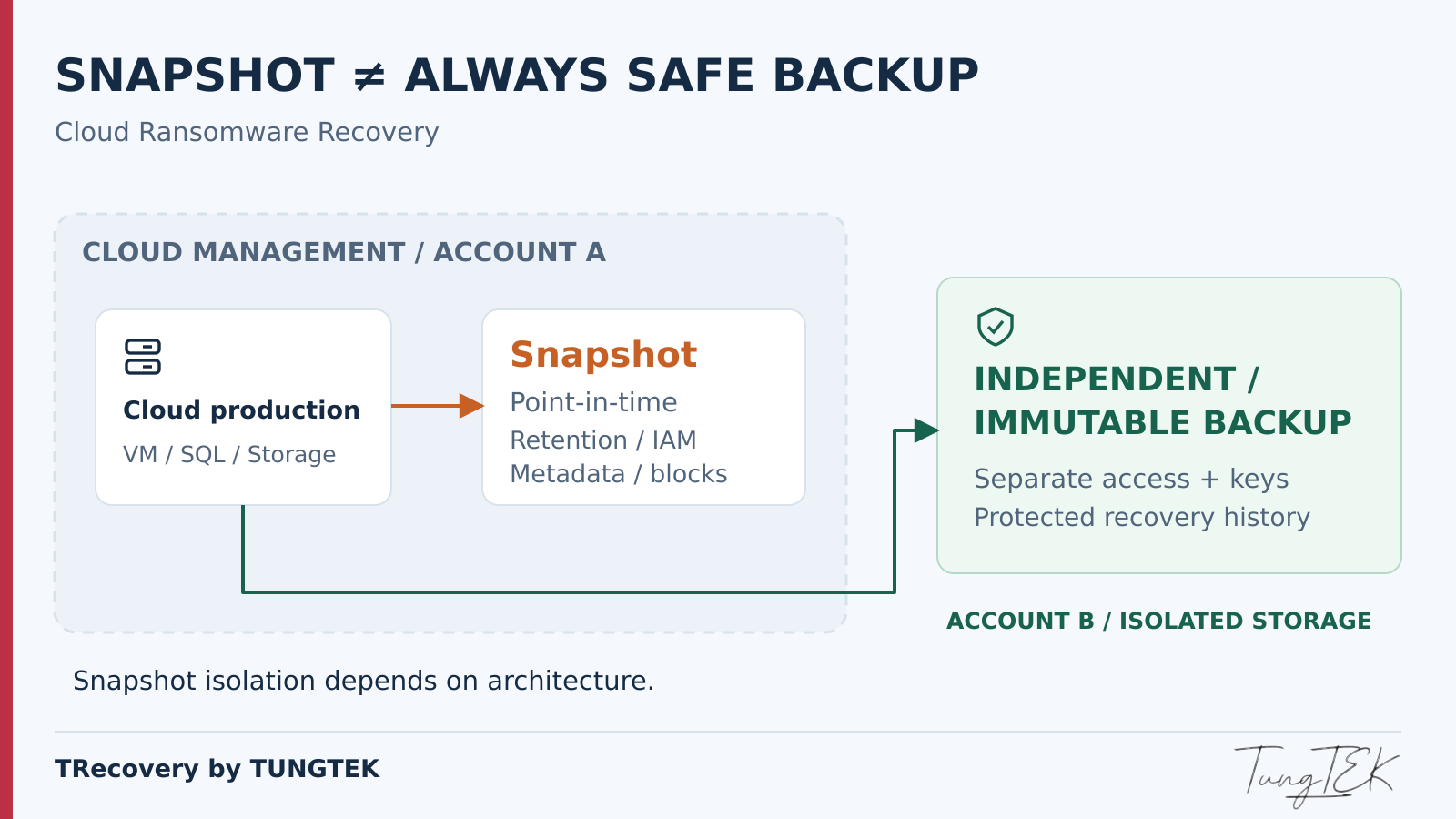
A snapshot can participate in a backup strategy, but every snapshot is not necessarily an independent backup. Verify whether the recovery source will still exist and remain usable after the events the business needs to withstand.
Read each platform's documentation carefully
IDC Frontier describes its snapshots as storing a volume's state on a different physical device from the source volume. It also states that this is not a long-term storage function, although scheduled snapshots can be used for backup. Its separate Backup service describes offsite storage and an immutable storage option. Those product descriptions do not establish which services affected IDCF customers purchased, configured or lost. [2] [3]
AWS describes EBS snapshots as incremental backups stored in AWS-managed S3 infrastructure, with the information needed to create a volume at the snapshot's point in time. Azure Backup includes processes that create snapshots and transfer data to a vault. The limitations of one kind of VM snapshot cannot therefore be applied to all cloud snapshots. [5] [7]
Six conditions to verify
- Accessibility: retrieve the copy when the source or primary console is unavailable.
- Integrity: retain all required blocks, metadata and application components.
- Isolation: avoid shared physical, account and network failure domains.
- Deletion resistance: ensure retention, versioning and protective locks actually work.
- Encryption keys: retain the keys and permissions required to restore.
- Clean recovery: demonstrate restoration in an independent environment.
4. Snapshot vs backup vs replication
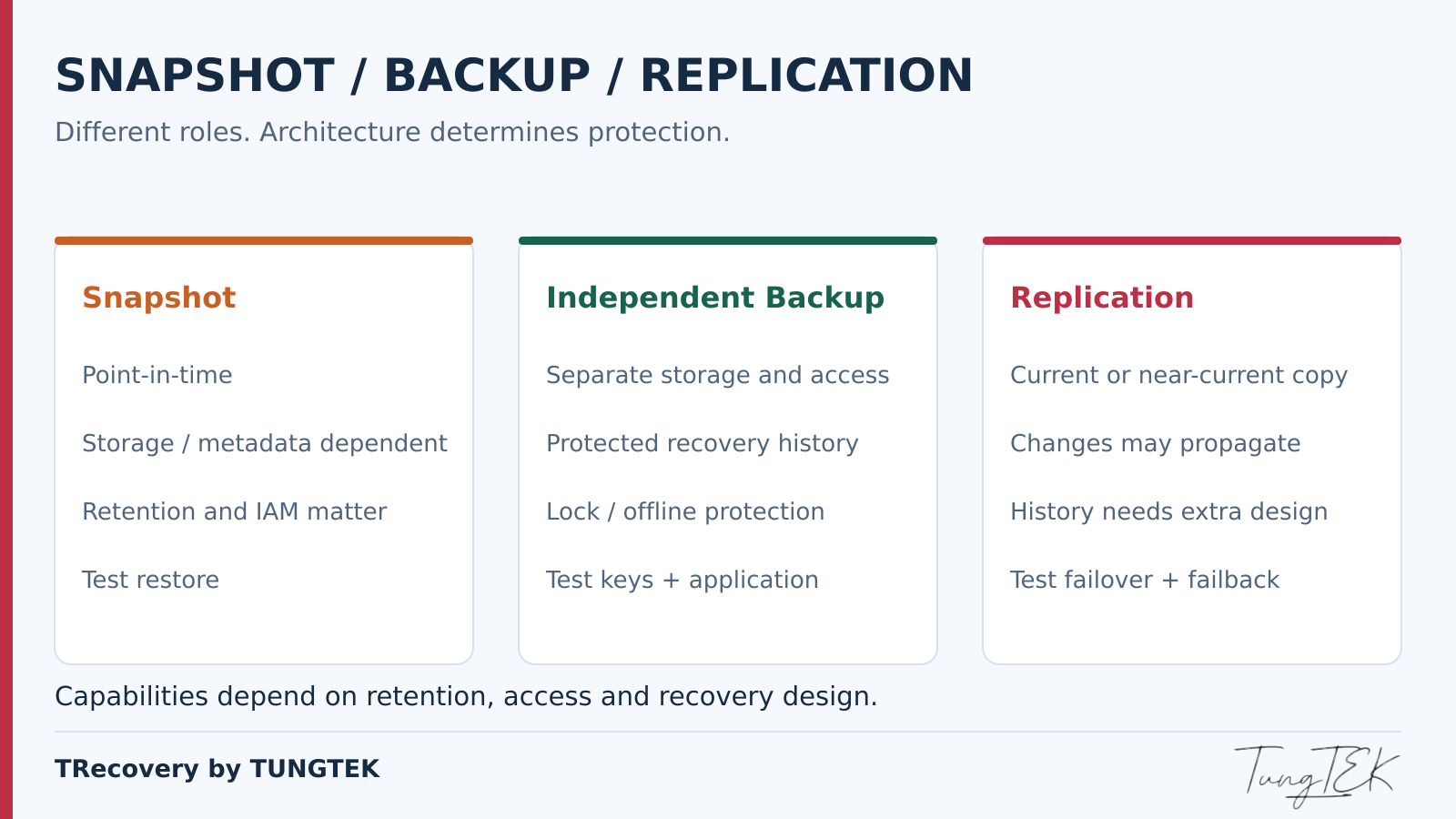
These three tools complement each other. Replication maintains an updated copy elsewhere, but may propagate malicious changes. Backup prioritises recovery history; snapshots prioritise a point-in-time state. Protection depends on the architecture.
| Criterion | Snapshot | Independent backup | Replication |
|---|---|---|---|
| Independence from source | Depends on location and dependencies. | Requires separate data, identity and key design. | May be elsewhere; still depends on synchronisation. |
| Earlier recovery points | Limited by retained snapshots. | Depends on valid history and catalogues. | Requires versioning or journaling to roll back. |
| Permission scope | Usually managed through cloud or storage permissions. | Separate operational and deletion accounts. | Review the source, destination and synchronisation identity. |
| Resistance to ransomware deletion | Requires suitable locking. | Requires locked immutability or an offline copy. | Ordinary synchronisation does not itself prevent deletion. |
| Recovery speed | Can be fast while dependencies remain available. | Depends on data size, bandwidth and restore method. | Failover may be fast; destination data must be clean. |
| Loss of control plane | Requires another access path. | Requires independent catalogues, keys and recovery infrastructure. | Requires independent destination control. |
| Exercises | Rebuild from a clean recovery point. | Test the full chain and applications. | Test failover, data and failback. |
TRecovery's reminder: a replica containing encrypted files does not become a clean recovery point merely because it resides in a second data centre.
5. Which cloud layers can ransomware affect?
This is a generic TRecovery scenario model, rather than a verified intrusion path or infrastructure diagram for IDCF.
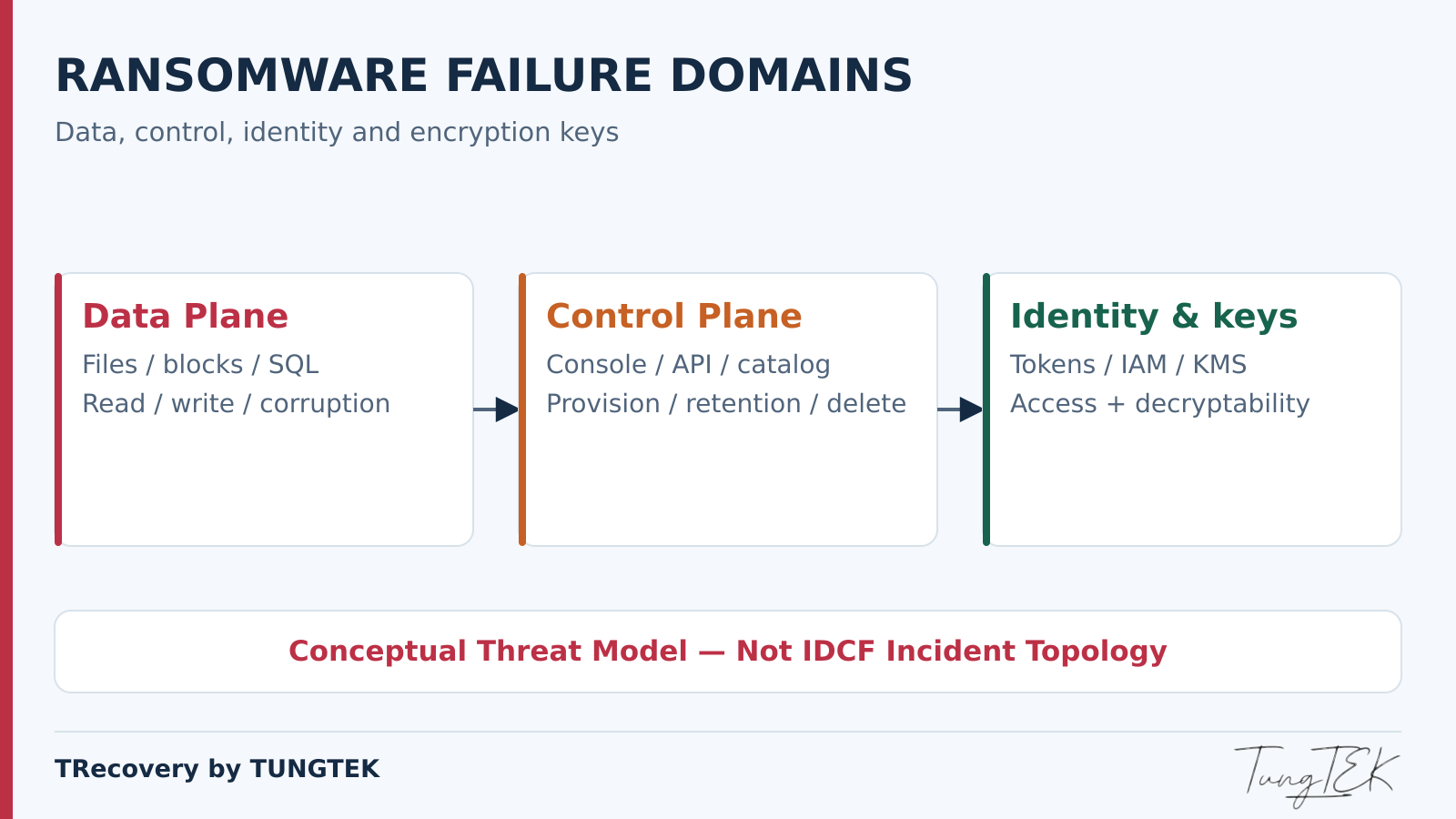
Data plane — reading and writing data
Files, databases or VM disks may be encrypted, deleted or overwritten. A snapshot taken before those changes is useful only if its blocks and access paths remain intact.
Control plane — managing resources
Consoles, APIs, catalogues and policies govern the creation and deletion of volumes, backups and recovery points. Data that has not been encrypted may still be unusable when its control plane cannot serve it.
Identity and key management — permissions and keys
A compromised token may grant deletion privileges. Lost or disabled encryption keys may block restoration. Separate storage managed through the same unrestricted account still shares an administrative risk.
Protect all three layers and maintain emergency access procedures that are recorded and tested outside production.
6. Three data recovery scenarios
The following examples are hypothetical planning scenarios, rather than customer recovery results or accounts of the IDCF incident.
A. A ransomware-affected VM with a surviving clean snapshot
Preserve the affected VM, choose a snapshot predating evidence of intrusion and rebuild a copy in an isolated network. Review logs, accounts, persistence and application data. A snapshot from before encryption may still contain an attacker who was already present. Returning to an earlier date does not by itself establish that the environment is clean.
Success requires a readable snapshot, all dependent disks, application consistency and a way to create a copy without overwriting the source.
B. Loss of the control plane or storage access
Confirm with the provider which resources still exist, which export methods are supported and which operations are permitted. If the console is unavailable, a support channel or a restored API may be needed. A volume name in a catalogue does not prove that all its data is ready to read.
Until a safe access path exists, prioritise recovery sources outside that environment. Waiting for infrastructure to return is part of the RTO risk.
C. Independent, protected and tested backups are available
Build a clean environment, load the necessary catalogues and keys, and restore using a rehearsed runbook. Reconcile data with business operations before reconnecting systems. Independence must cover permissions, keys and recovery paths, rather than merely a different storage address.
7. SQL Server, BRAVO, FAST, MISA and business data
Versions and deployments of BRAVO, FAST and MISA do not necessarily use the same database architecture. First identify the database engine, version, recovery model and application vendor's documentation. The guidance below applies to systems that actually run SQL Server.
MDF/NDF/LDF and backup types
MDF is the primary data file; NDF is an additional data file; LDF contains the transaction log. A database may also depend on FILESTREAM or other components. Copying an open MDF does not automatically create a consistent backup set. [13]
A full backup provides a restore foundation. A differential backup contains changes since its base full backup, rather than since the previous differential. Transaction log backups preserve the transaction chain under a suitable recovery model. An LDF file and a TRN log backup file are different objects. [11]
Crash-consistent and application-consistent
Crash consistency resembles disk state following a sudden power loss: the application must perform its own recovery, and required components must align in time. Application consistency involves cooperation with the application. On Windows, Azure Backup uses VSS in its application-consistent snapshot process. [7]
TRecovery's perspective: check SQL VSS Writer and actual job results rather than relying only on a “VM backup successful” label. Separately capturing volumes holding MDF and LDF may fail to provide the required consistency.
Restore chains and data validation
Point-in-time restoration requires a suitable full backup, a differential if used, and an unbroken sequence of log backups applied in order to the target time. Intermediate steps retain NORECOVERY; STOPAT is applied appropriately when restoring logs. A missing required segment may limit the recovery point. [9]
On an isolated restored copy, check integrity and exercise business workflows: sign-in, vouchers, receivables and payables, inventory, and accounting periods. RESTORE VERIFYONLY does not replace a real restore or database structure validation. [14]
DBCC CHECKDB checks logical and physical integrity. Repair options may lose data; preserve a source copy before considering intervention. [12] Extracting tables and restoring a usable ERP application are separate outcomes requiring separate acceptance checks.
8. The 3-2-1-1-0 backup architecture
Veeam describes 3-2-1-1-0 as an extension of the 3-2-1 rule that adds an offline, air-gapped or immutable copy and recovery verification. It is a design principle, rather than a certification that every configuration bearing that label is safe. [15]
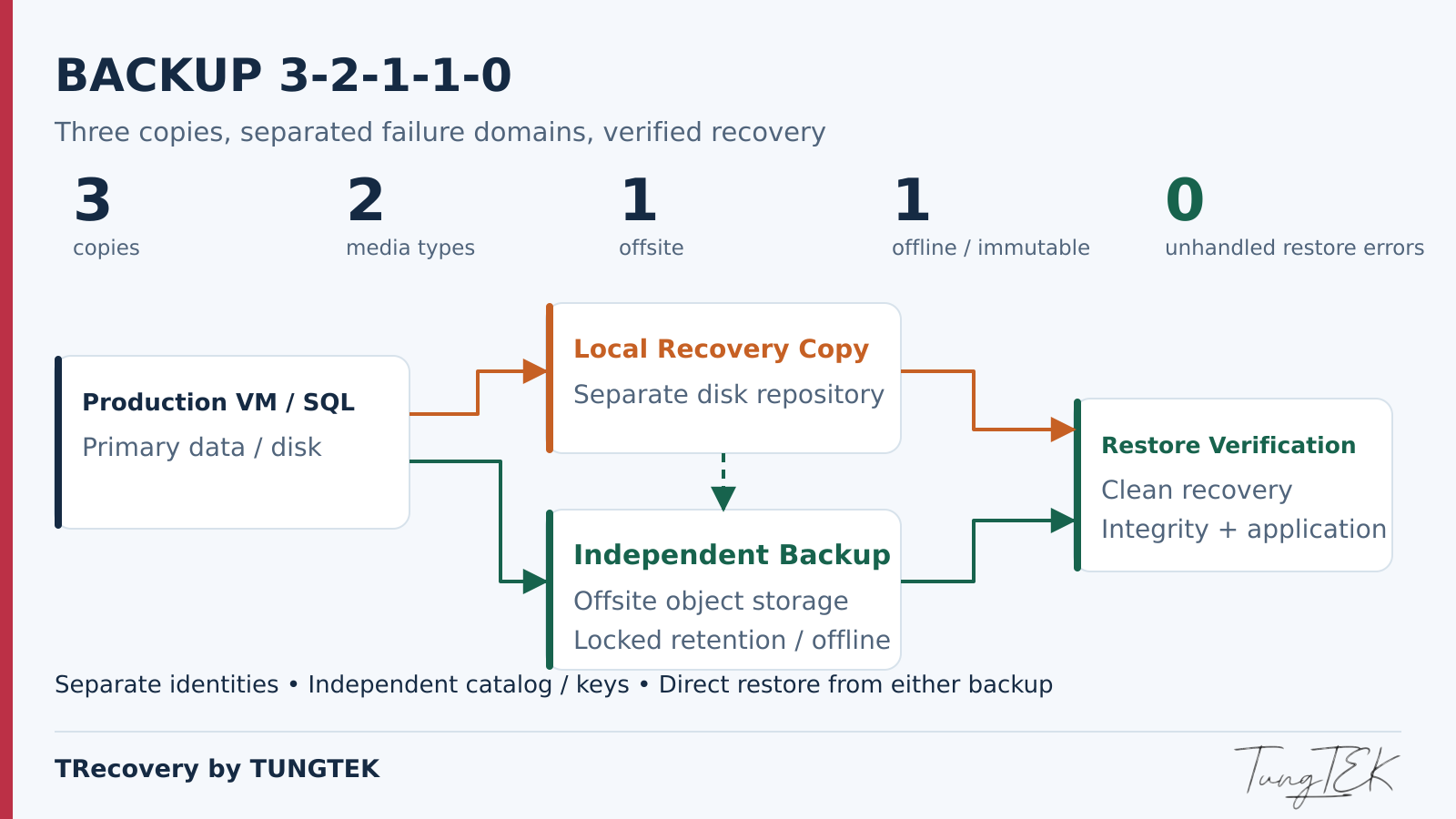
- 3 — Three data copies
- Production plus at least two backup copies.
- 2 — Two media types
- For example, a disk repository and object storage; also assess independent failure domains.
- 1 — One offsite copy
- Separate from incidents affecting the primary location.
- 1 — One offline or immutable copy
- Protect a copy against unauthorised changes and deletion.
- 0 — No unresolved recovery errors
- Verify restoration, integrity and applications; this does not promise zero risk.
An example for Vietnamese SMEs
Production runs VM/SQL workloads. A separate repository holds fast recovery copies. Backups are copied to offsite object storage using a separate account. At least one copy has locked retention or rotates to offline media. The destination remains readable if the internal repository stops working; catalogues, keys and runbooks have independent copies.
Production accounts cannot delete the backup store. Segment networks and restrict management ports; use MFA and least privilege. Test restoration without the usual operating account to uncover hidden dependencies.
Immutability requires the correct locked state. AWS distinguishes governance and compliance modes; Azure distinguishes enabling immutability from locking its configuration. Check actual enforcement rather than merely observing an enabled switch. [6] [8]
9. RPO/RTO and an illustrative backup schedule
RPO is the acceptable amount of data loss expressed in time; RTO is the target time to restore service. Business leaders should agree both objectives according to operational needs, then IT should measure whether they are achievable.
| Task | Illustrative schedule | What to measure |
|---|---|---|
| Full backup | Nightly | Base restore duration and readability. |
| Differential | Every four hours | The correct full base and loading time. |
| Log backup | Every 15 minutes | An unbroken chain and delivery to protected storage. |
| Restore verification | Weekly samples; a full-system exercise quarterly | Integrity, business workflows and total recovery time. |
This schedule is a starting point rather than a commitment. If the latest logs have not reached independent storage, or the clean recovery point is older, actual RPO may exceed 15 minutes. Provisioning servers, downloading backups, unlocking keys, restoring and validating applications all count towards RTO. Adjust the schedule to data size, bandwidth and exercise results.
10. A cloud ransomware response workflow
CISA recommends offline, encrypted backups and regular testing. During incident response, TRecovery applies preservation and recovery principles through the workflow below. [4]
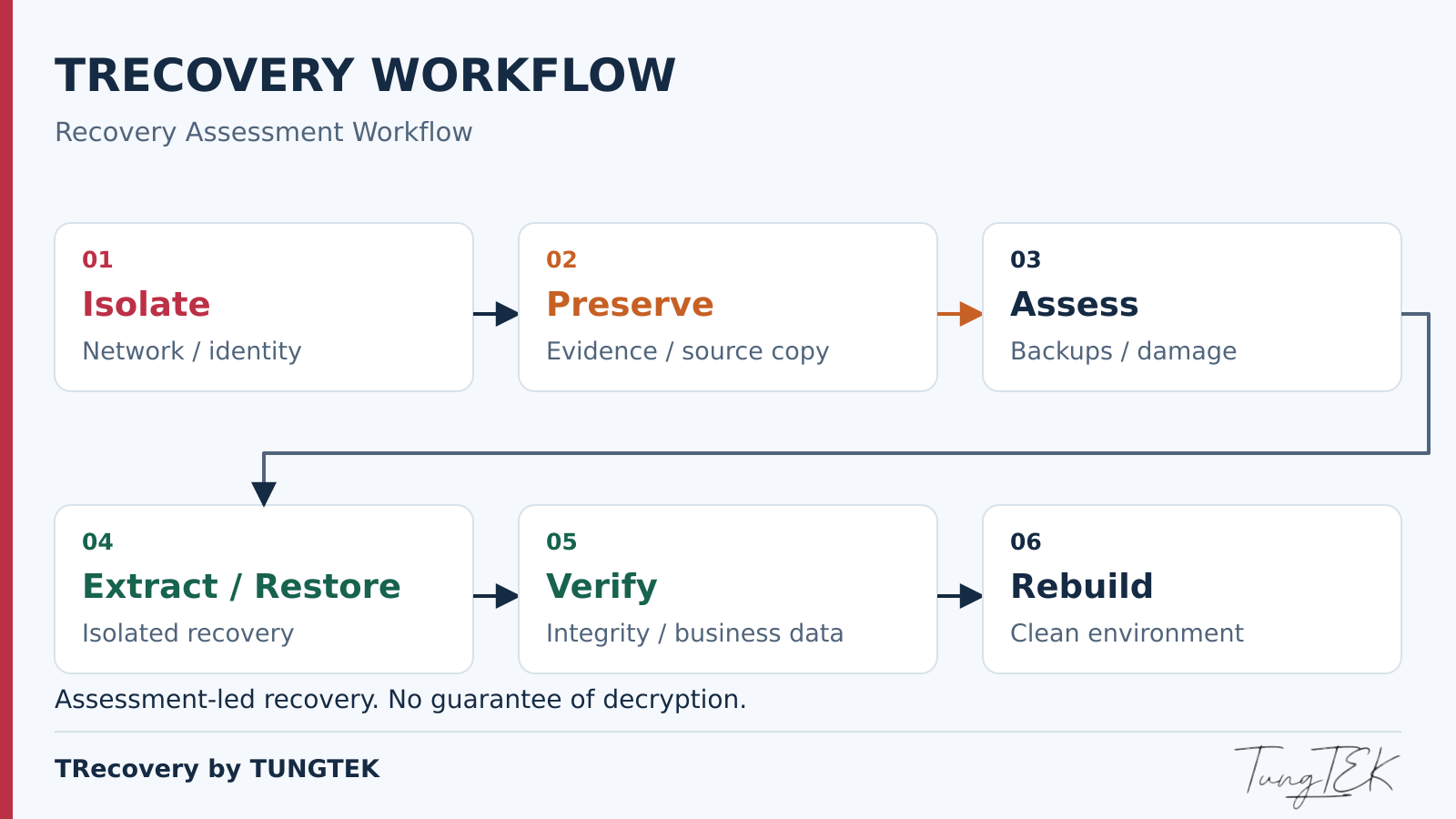
- Isolate: block suspected compromised connections and credentials according to the response plan. Coordinate with the provider for resources on infrastructure it manages.
- Preserve evidence: retain logs, timelines, configuration, notices and resource identifiers. Collect volatile evidence when appropriate and feasible; create supported copies or images before intervention.
- Check backups: inventory local, offsite, immutable and offline copies; verify read paths, catalogues and keys. Do not expose originals to a suspected infected environment.
- Choose a clean point: compare intrusion history, retention and consistency rather than automatically selecting the latest copy.
- Extract safely: work on copies, record tools, sources and scope, and retain checksums where appropriate.
- Restore in isolation: use clean servers and accounts with limited connectivity; check for malware and configuration problems before opening the service.
- Validate data: reconcile files, databases and business workflows, identify missing portions, and document limitations.
- Rebuild: address the cause, rotate credentials, patch systems and verify new backups before returning to operation.
11. Can data still be recovered without a backup?
Having no backup reduces the available options but does not, by itself, establish that all data is lost. Classify the actual state using evidence and representative samples.
- Data exists but access is lost: restore permissions or use a supported export path; decryption may not be needed.
- Damaged metadata or volumes: assess storage structures and readability on copies, subject to infrastructure access.
- Partial encryption: examine intact regions, file structures and data relationships. The percentage of surviving bytes does not equal the percentage of an application that can be recovered.
- Strong encryption without keys: when cryptography is implemented correctly and no other source remains, practical recovery from ciphertext is usually unavailable.
- Missing consistent database components: partial extraction may be possible without yielding a complete database or ERP system.
Exported reports, workstations and integrated systems may hold supplementary data. Verify their provenance, date and completeness. Do not promise a recovery rate before assessment or overwrite the source merely to test a possibility.
See the IronChain analysis and recovery limits or Ransomware Fast Check (RFC) for the assessment stage.
12. TRecovery's perspective: cloud loss does not establish total data loss
This is the technical perspective of TRecovery by TUNGTEK, rather than a direct forensic assessment of the IDCF Cloud incident. Before choosing an approach, a recovery team should answer four questions:
- Which sources still contain the data?
- Is the data encrypted, or has access been lost?
- Can it be extracted without altering the source?
- Can the extracted data support restoration of a usable application?
After a ransomware incident, begin by preserving the data source, establishing its actual state and assessing recoverability before implementing a response. Avoid overwriting data, reinitialising volumes or attempting arbitrary restoration as the first step.
Technical recommendation — TRecovery by TUNGTEK
13. Ten readiness questions for businesses
Use this checklist with IT and business owners. Every answer needs evidence, an accountable owner and a corrective action if the requirement is unmet.
- Sources: have databases, volumes, configuration files and application dependencies been inventoried?
- Independence: can backups still be retrieved if production or the primary console is lost?
- Permissions: can a production account delete every copy?
- Retention: is a recovery point from before the suspected intrusion retained?
- Deletion resistance: is immutability locked, or is an offline copy actually disconnected?
- Keys: can keys and certificates be obtained after losing the primary server or account?
- Consistency: do snapshots and backups cover all required volumes and applications?
- SQL: are the full base, differential and required log chain available and continuous?
- Exercises: did the latest restore check integrity and business workflows?
- Operations: what RPO/RTO has been measured, and who authorises service restoration?
“Not tested yet” identifies a gap that needs attention.
14. Conclusion: assess backups by their ability to restore
Snapshots can be valuable components of cloud backup. Their protection must be demonstrated through accessible, intact, isolated and deletion-resistant data, and restoration in a clean environment. The IDCF incident raises this question for businesses, but does not justify assumptions about individual snapshots or backup services whose status has not been disclosed.
TRECOVERY BY TUNGTEK
Ransomware & Data Recovery
TRecovery assesses data condition, extracts encrypted data where feasible and identifies recovery options for SQL Server, NAS, RAID, VMware and enterprise storage systems.
Data incident? Contact TUNGTEK.Zalo/Hotline: +84 963 509 115Follow ransomware intelligence and developments in Vietnam and internationally at Ransomware.VN.
References
Public documentation reviewed on 9 October 2026. The IDCF incident status described here is based on the notice of 8 October 2026.
- IDC Frontier — Third incident notice, 8 October 2026
- IDC Frontier — Snapshot features and scope
- IDC Frontier — Backup service and storage locations
- CISA — #StopRansomware Guide
- AWS — Amazon EBS snapshots
- AWS — Backup Vault Lock
- Microsoft — Azure Backup architecture
- Microsoft — Azure Backup data protection best practices
- Microsoft — SQL Server point-in-time restore
- Broadcom — VMware snapshot best practices
- Microsoft — Back up and restore SQL Server databases
- Microsoft — DBCC CHECKDB
- Microsoft — Database files and filegroups
- Microsoft — RESTORE VERIFYONLY
- Veeam — The 3-2-1 and 3-2-1-1-0 backup rules
TRecovery's analysis, examples and diagrams are independently produced editorial content. No assumptions are made about individual IDCF snapshots or backups without public evidence. No decryption or recovery success rate is guaranteed.